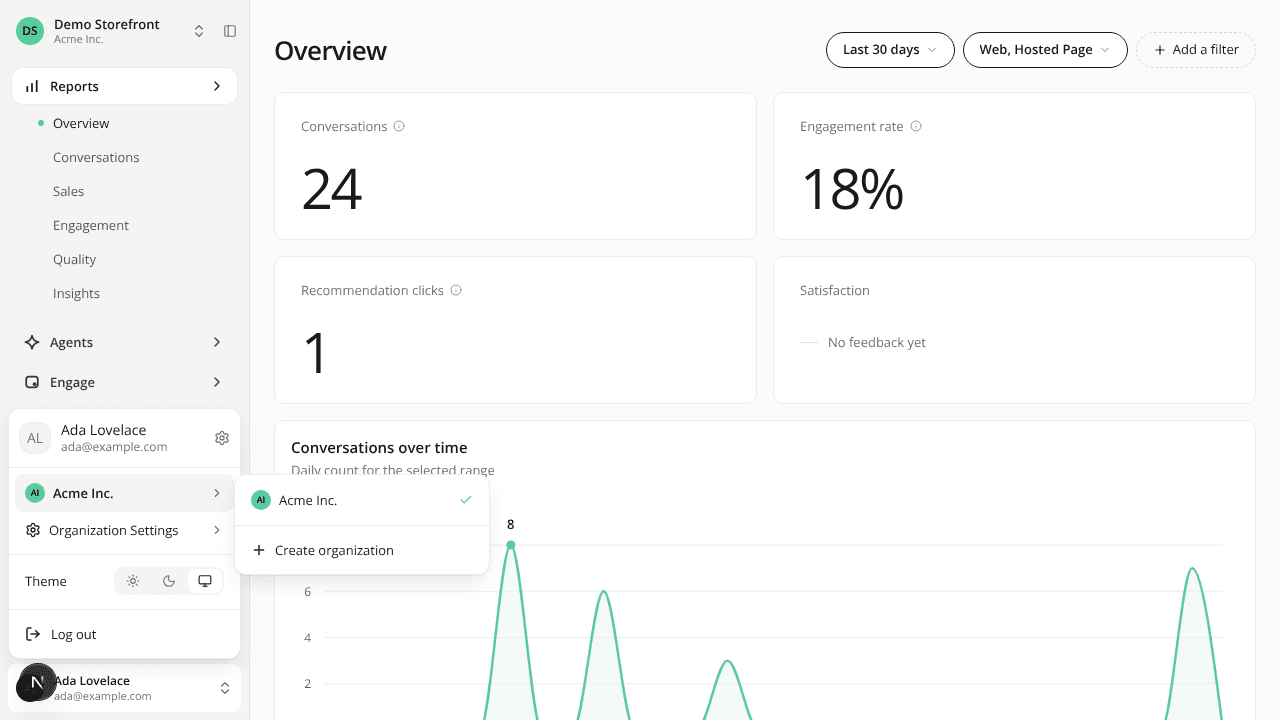
The organization switcher is one row, and switching updates the whole sidebar
ChangedSwitching organization updates everything. Pick another organization in the user menu and the sidebar changes with the page: its sites, its navigation and the menu itself. Before, part of the sidebar could keep showing the organization you had just left until you reloaded.
The list is ready when you open the menu. It is requested while the dashboard loads, so you no longer wait for it after clicking. A switch that takes more than a second shows a spinner on the row, and a failed one tells you so and leaves you where you were.
One row, however many organizations you have. The menu shows your current organization on a single row that opens the list. Above five organizations, a search field appears at the top of the list. Create organization moved there from Organization Settings, which now only shows for members whose role grants at least one settings page. On a narrow screen the list replaces the menu in place, with a back arrow.
Going back to an organization opens the site you last used in it. The dashboard remembers one site per organization, in your browser. An organization you haven't picked a site in yet opens on its oldest site, as before.
The site switcher lost its Web link. The link to your live storefront is gone. The site list itself shows a search field only above five sites.
Resources