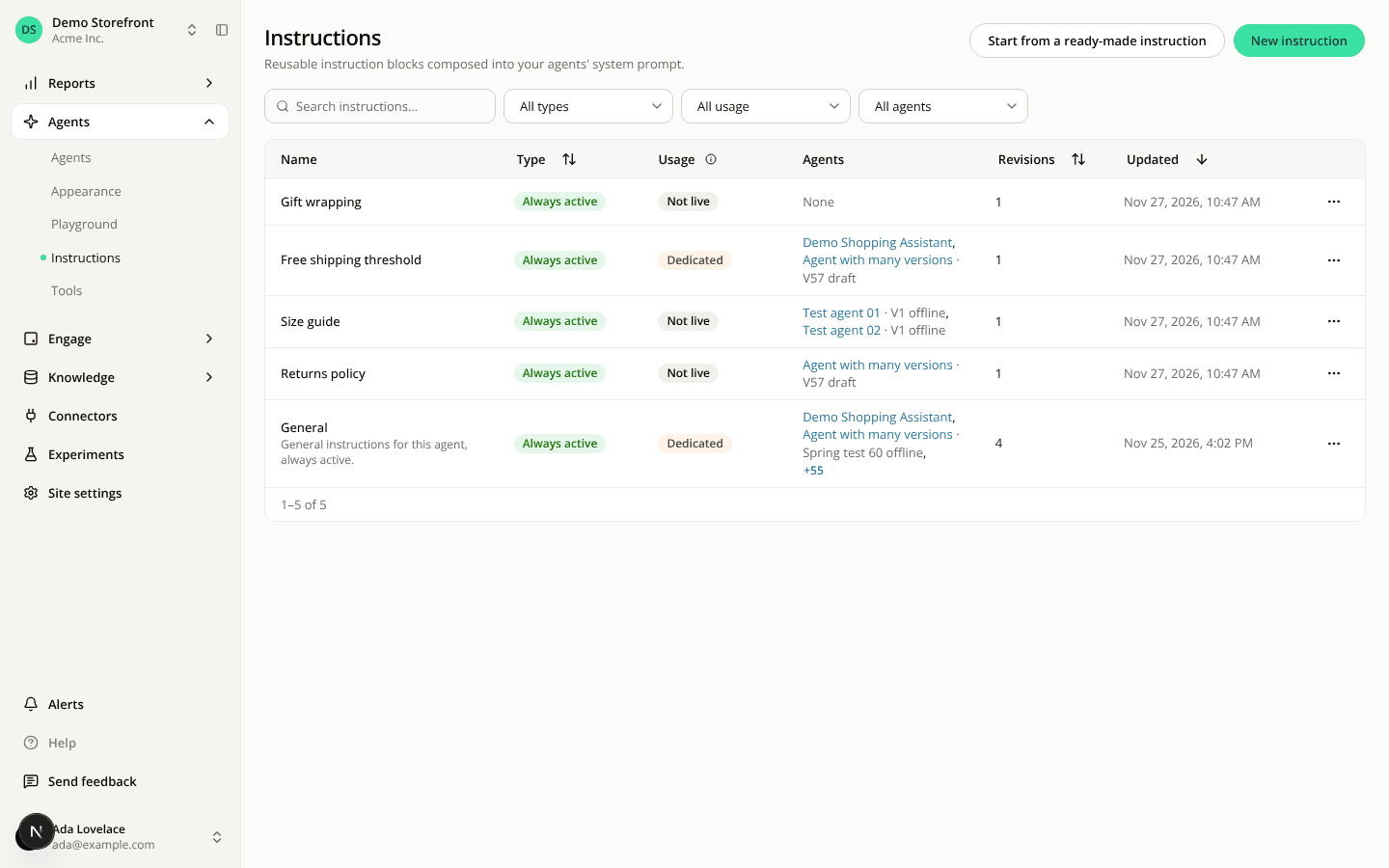
The Instructions list now counts only the agents that serve a block
FixedOn the Instructions page, the Usage badge counted every agent whose live version included a block, even an agent you had taken offline. A block could read Dedicated while no shopper ever got it.
Usage now counts only the agents that serve a block to shoppers: the agent that answers on your site, an agent live on its own link while your AI Storefront is published, and a version in a running A/B test. Everything else holds the block without serving it.
- Unused is now Not live. The badge and the Usage filter use the new name. Links you saved with this filter still work.
- The Agents column shows every agent that holds the block. Agents that serve it come first. Every agent except the one that answers on your site carries a short note after its name, such as · V3 draft, · V2 offline, · V2 live on its link or · V4 in A/B test, so a Not live block tells you where it sits. The Agent filter finds those agents too.
- The delete confirmation names every version the block is in. It says Live right now on an agent live on your site or on its own link, In an A/B test right now on a version under test, and Also in … not live for an offline agent or a draft, even a newer draft of the live agent, because that version can no longer go live once the block is deleted.
Resources