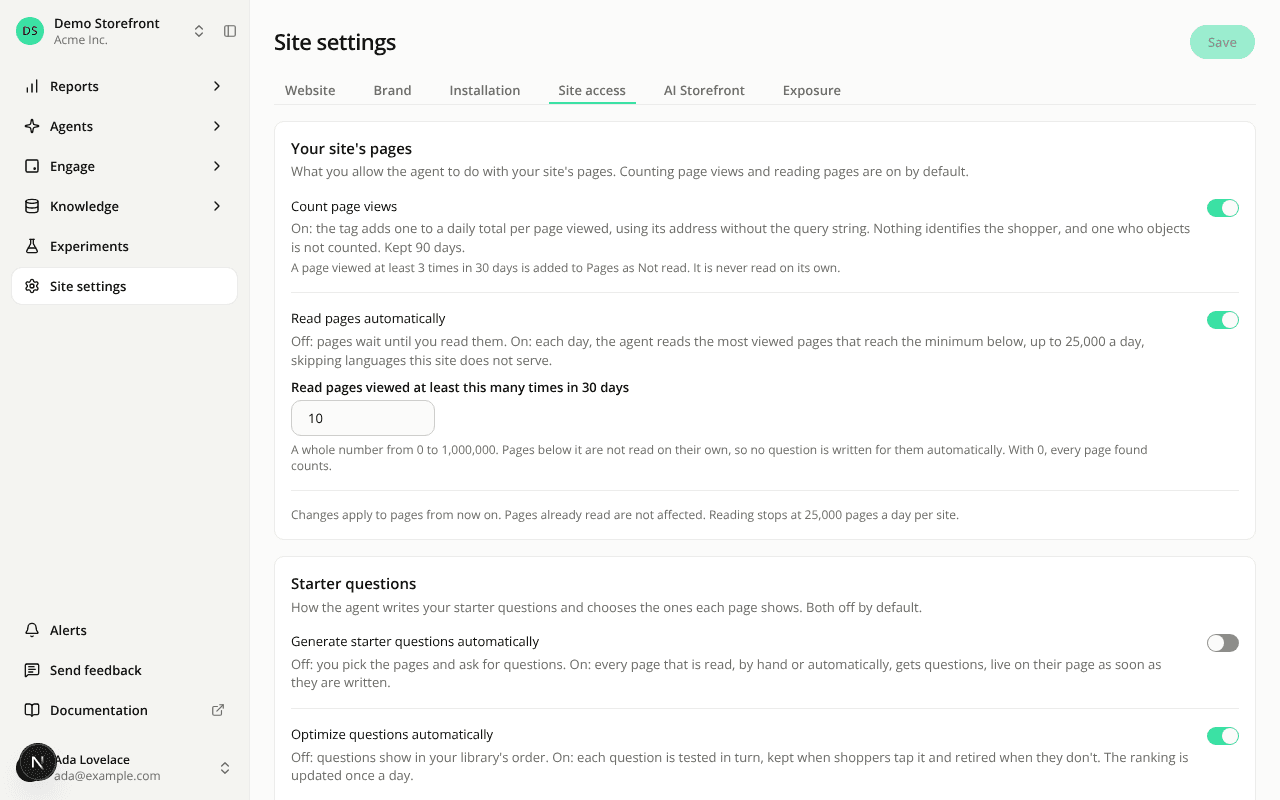
Let a daily ranking choose your starter questions
AddedUntil now, a page showed the first three starter questions of your library that fit it, and the questions further down never got a chance unless you moved them up. Turn on Optimize questions automatically, in Site settings → Site access on the Starter questions card, and a ranking decides instead, once a day.
Each question gets its turn. It is tested from its first impression until it reaches 200 impressions, then kept if its click-through rate is at least 85% of your site's rate, or retired if it falls below. A kept question that drops below that level over 14 days is retired too. Each page then shows at most two kept questions, best first, then questions in test, then new ones. Retired questions only fill a slot nothing else fills.
A few things to know:
- Off by default. Nothing changes until you switch it on. On a site that never had it on, pages keep your library's order until the first daily run.
- Editing restarts a question. A retired question stays retired, unless you change its wording or its targeting: it then starts again as new.
- Off means library order again, within a few minutes.
- The ranking itself is not shown. The Questions page says the order is automatic, and a question not shown yet reads Waiting for its turn. On a page's view in Pages, the starter questions follow the day's order, and a retired question the page does not show reads Retired: clicked less than the others. The REST API (
startersSelfImprovementEnabledon the site) and the MCP server (set_site_automation,list_sites) read and set the switch.
Resources