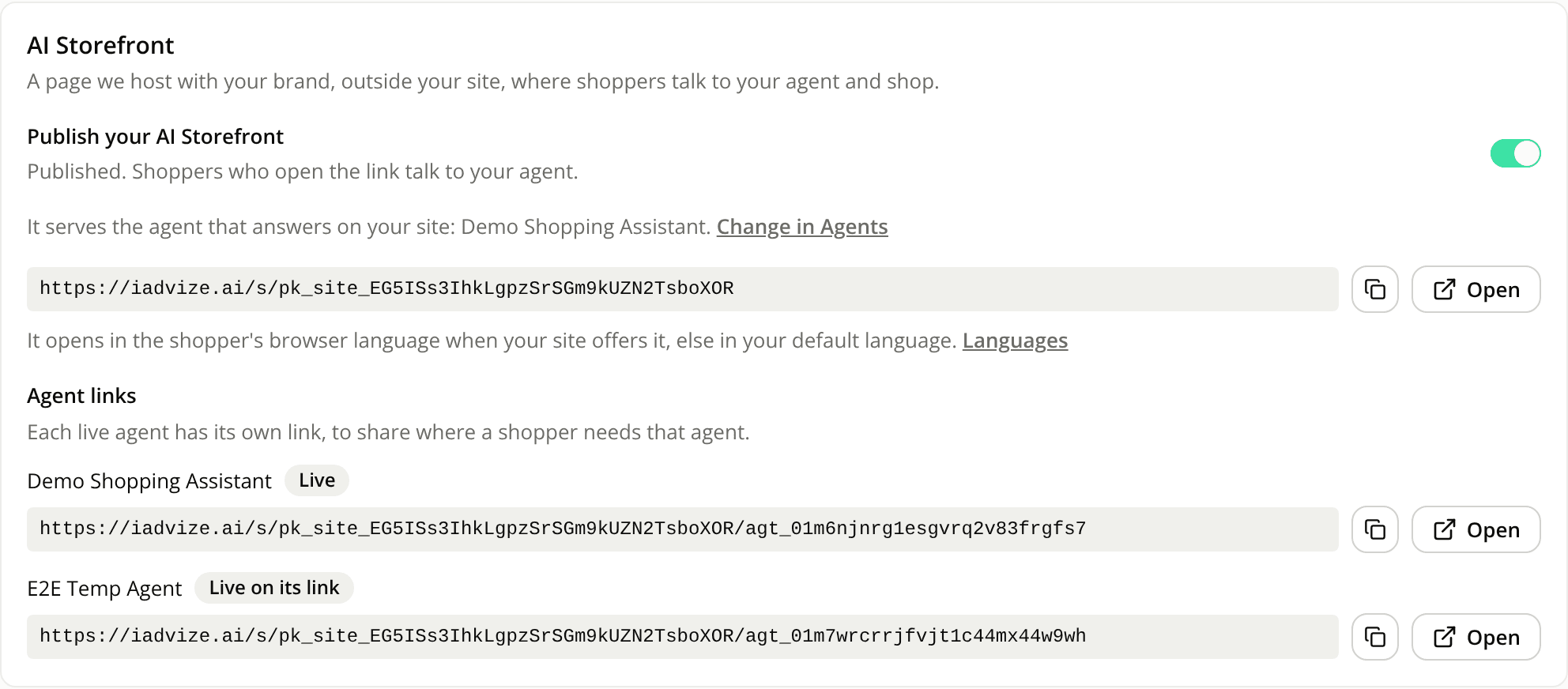
Each agent now has its own AI Storefront link
AddedUntil now, the AI Storefront link of a site opened only the agent that answers on the site. An agent that didn't answer there couldn't reach any shopper.
One link per agent. Each live agent has its own link, https://iadvize.ai/s/<site-key>/<agent-id>. Copy it from the Agent link card in the agent's editor, beside the form, or from the new Agent links list in the site's AI Storefront tab. Share a pre-sales agent in a campaign and an after-sales agent in your help center, from the same site. The site link keeps opening the agent that answers on the site, and the web tag is unchanged.
Choose where an agent goes live. Go live now asks: On your site and its link, or On its link only, which leaves the agent that answers on your site in place. A member who can't edit the site can still put an agent live on its link only.
Shared links keep working. When another agent takes over on your site, the agent it replaces stays live on its link. Take offline stops the agent on its link too. An agent then reads one of three statuses: Live, Live on its link or Offline.
Nothing leaks from a dead link. A link whose agent is offline, deleted or never live shows "The agent is not available right now." with your site's branding, and nothing about the agent. An agent link works only while the AI Storefront is published, and rotating the site key changes every agent link along with the site link.
In the API and the MCP server. The agent list and read return status (live, link_only or offline) and hostedLink. Go-live takes a placement (site or link, site by default), refused with invalid_placement for link on the agent that answers on the site. The MCP server adds go_live_agent_version and take_agent_offline, and list_sites gives each agent its new status and hostedLink.
Resources