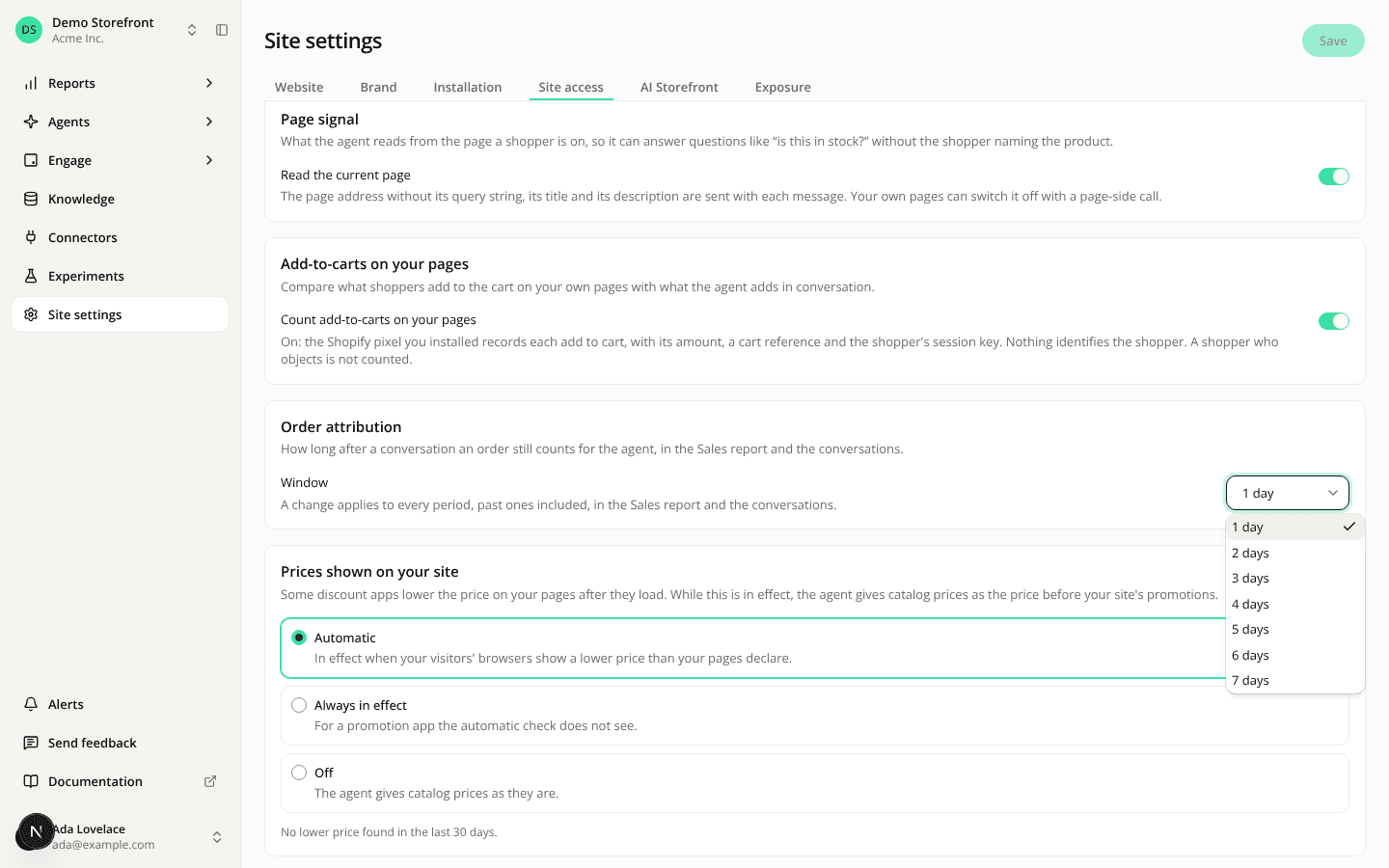
Choose how long after a conversation an order counts for the agent
AddedAn order counts for the agent when it is placed within the attribution window after the shopper's last message. That window was fixed at 24 hours for every site. A store whose shoppers take a few days to decide had its sales credited to no one.
You now choose the window per site. Open Site settings > Site access and pick 1 to 7 days in Window, on the Order attribution card. The change waits for Save, like the other settings of the tab.
- New sites start at 7 days. A new site begins with a 7-day window (168 hours). A site that existed before this setting kept 24 hours, so its figures don't move until you change it.
- Past periods follow the change. Attribution is worked out each time a figure is read, so a new window re-reads every period, past ones included. Revenue credited to the agent, its orders and its conversion rate can change for a month you already reported on.
- Every figure uses the same window. The Sales report, the orders listed on a conversation with their status, and the same figures over the REST API and the MCP server all read an order with the window of the site it was recorded on.
The Sales report's attribution note now names the site's window in days or hours, and links to the setting with Change the window. An order marked Out of window on a conversation has the same link.
Over the API, the window is orderAttributionWindowHours on the site, a whole number of hours from 1 to 168, set with Update a site or the MCP server's set_site_automation. Each change is recorded in Admin activity as Order attribution window changed.
Resources