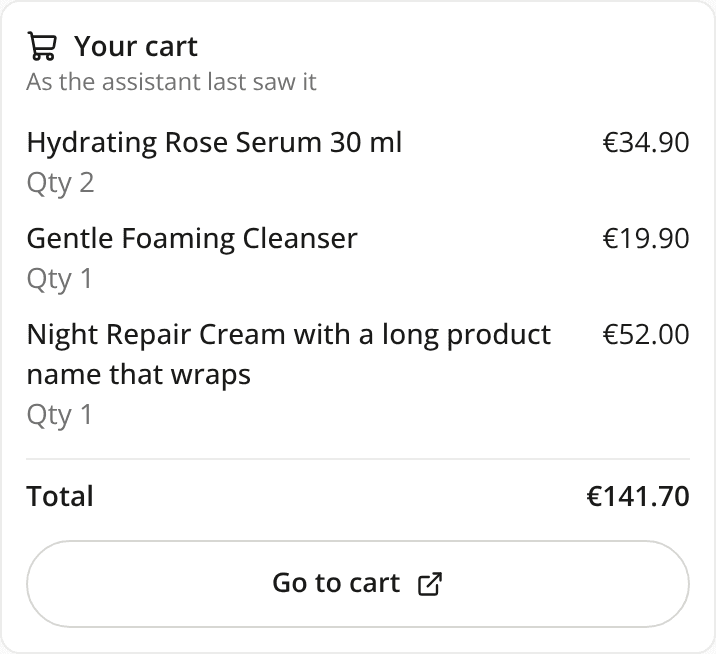
The panel shows the shopper's Shopify cart as a card
AddedShoppers now see their cart in the chat. On a Shopify store with the web tag, the assistant works on the shopper's own cart. Until now, the only trace of a cart change in the panel was the assistant's sentence about it. Now, each time the assistant reads or changes the cart, a card under its answer shows the cart as Shopify returned it.
The card lists each product with its quantity and unit price (the first 5, then "+N more"), and the cart total when Shopify gives one. Go to cart opens your store's cart page in a new tab.
A few things to know:
- Only the latest card shows in full. Earlier cards in the conversation collapse to one line, such as "Cart: 3 items", still with Go to cart.
- The card is a snapshot. It does not update when the shopper changes the cart on your site. The next time the assistant reads the cart, a new card shows it as it is then.
- It's read-only. The shopper changes the cart by asking the assistant or on your cart page.
- Web tag on Shopify only. The AI Storefront, the Playground and other platforms keep their separate cart and show no card.
Card views and Go to cart taps are recorded, but they stay out of your product impression and click figures and the Event check table: a cart is not a product.
Nothing to set up.
Resources