Preview and evaluate an agent from its editor
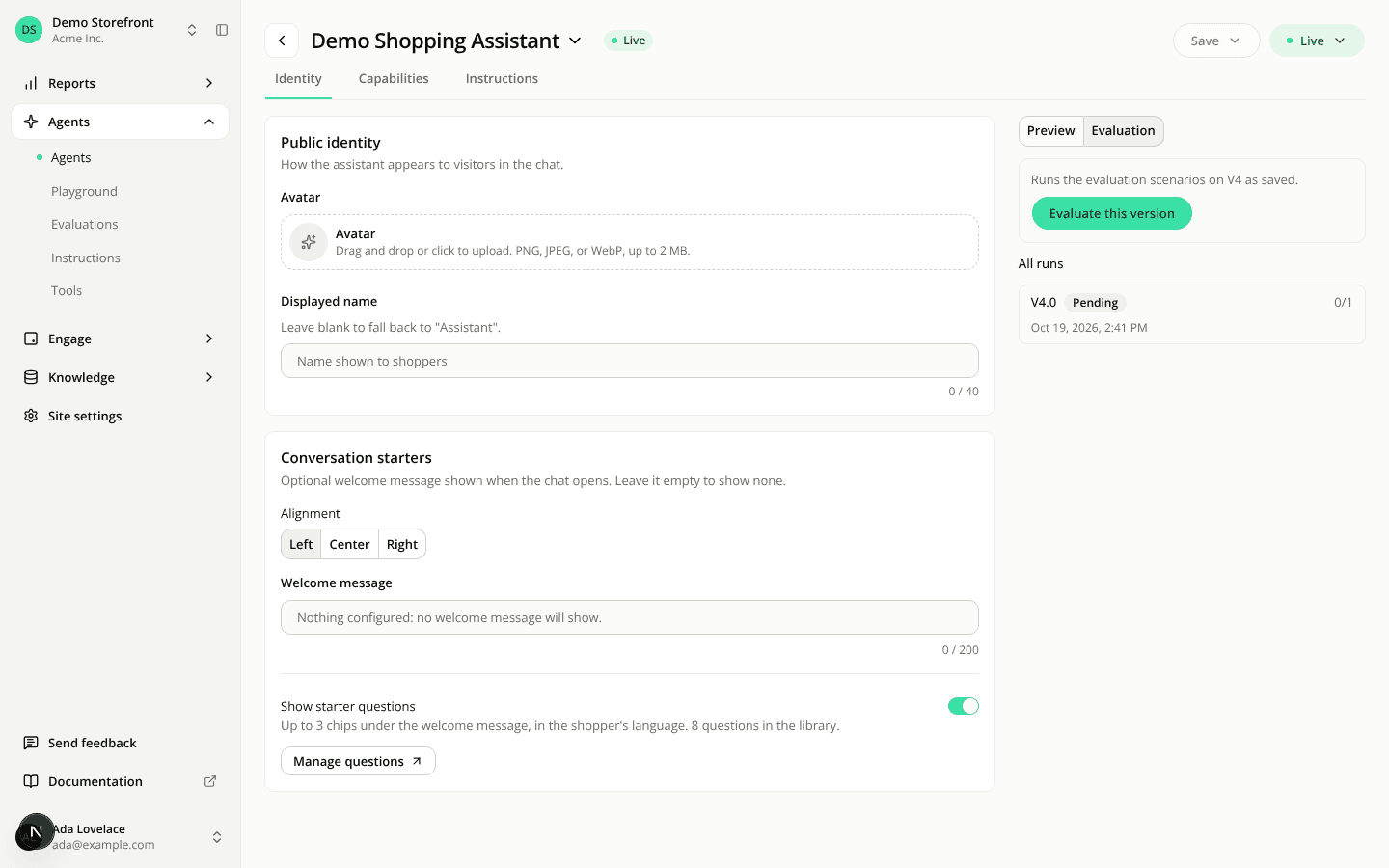
AddedTry a version without leaving the editor. On an agent's Identity, Capabilities and Instructions tabs, a panel now sits next to the form, with two views: Preview and Evaluation. On a narrower screen it moves below the form and takes the full width.
Preview is a conversation with the saved version the editor shows, displayed the way a shopper sees it: no tool calls, no debug detail. New conversation starts over. When you save, the editor moves to what you just saved and the preview starts a fresh conversation on it.
Evaluation has an Evaluate this version button, with a line above it naming the version (V2, or its name). It opens the launch screen with the agent and that version already picked, so you only choose the scenarios. Below it, All runs lists every run of the agent, newest first, each named by the exact saved state it graded (for example V2.1), with its status, score and date. Each one opens its results.
The panel uses what is saved. While you have unsaved changes, a note says the panel still uses the version as last saved. Save to try your changes. An agent with no saved version yet asks you to save a first one.
The Evaluations tab is gone. An agent's tabs are now Identity, Capabilities and Instructions, and its runs live in the panel. An old link to the tab opens the editor on the Evaluation view. A member who can't edit agents sees no tabs on the agent's page, and finds its runs in the Evaluations hub, which an old link opens filtered to that agent.
Resources