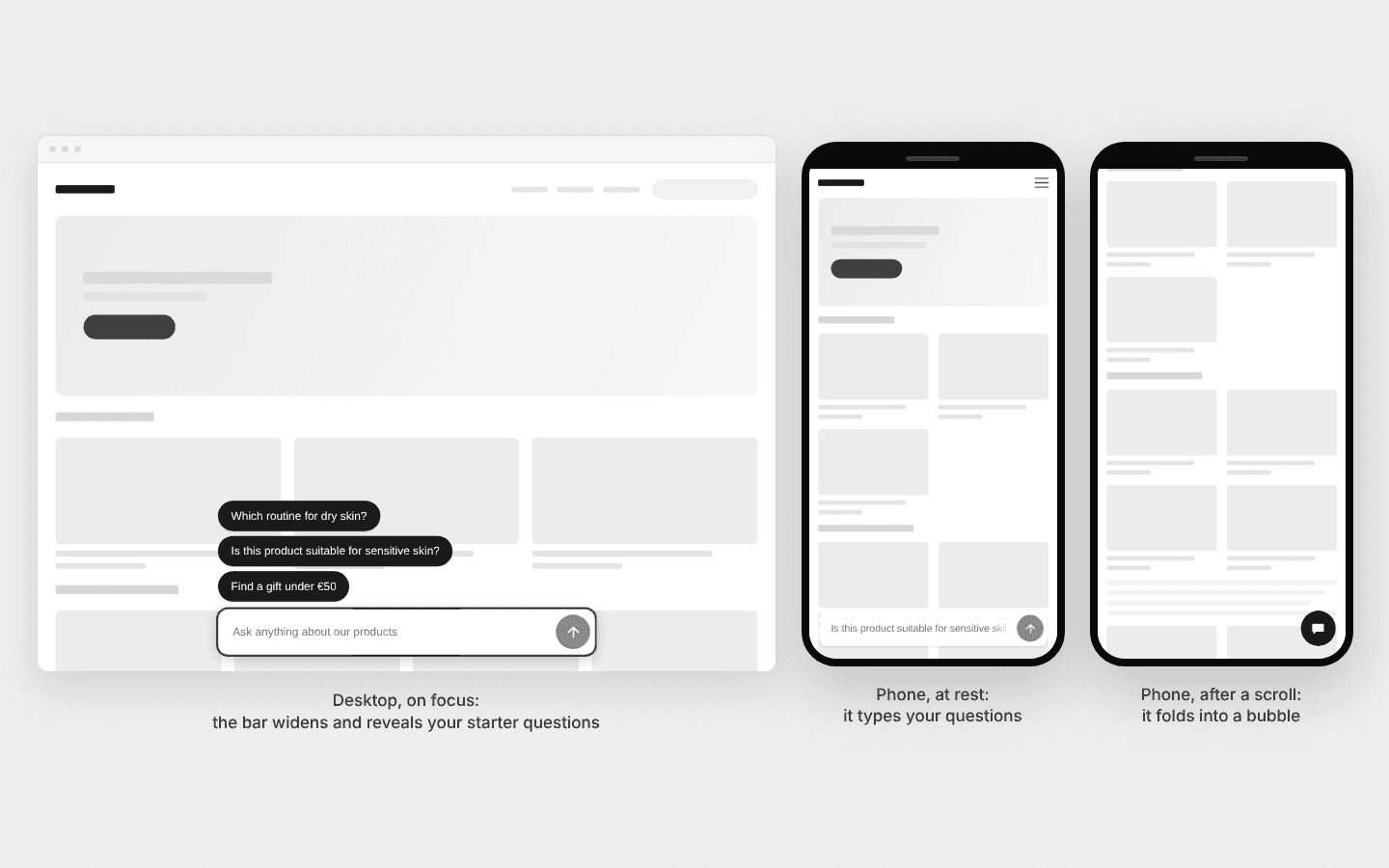
The question bar rests, engages and folds
AddedThe question bar used to show up to three starter-question chips above it all the time, for every shopper, on a phone as on a desktop. It now takes little room until a shopper shows interest.
At rest, the bar shows no chip. Its empty field types your starter questions, one after the other, in a loop. It stops when the field gets focus or the shopper starts typing. With the system's reduced-motion setting on, it shows the first question, still. Your placeholder is still what a screen reader announces for the field. The typed questions are a decorative layer that screen readers skip, and there is no pause control on the page.
Focus engages it. The chips reveal one by one, the bottom one first. The shadow steps up one level of the widget's Shadow setting. On a desktop window wider than 767px, the bar widens around its centre, to 462px (Small), 520px (Medium) or 620px (Large) at a 1512px window, against 361px, 378px and 414px at rest. It stays inside the window minus 16px on each side and never goes past 640px. Escape, or focus leaving the bar, returns it to rest. A click anywhere on the bar, apart from the send button, puts focus in the field.
On a phone, an idle bar folds. At 767px or less, once a shopper scrolls down 48px with no focus in the bar and nothing typed, it folds into a round bubble at the bar's right edge. Reloading a page part-way down does not fold it: the 48px count from where the page stands half a second after the bar appears. Scrolling back up does not unfold it. A tap on the bubble does, and puts focus in the field.
The width follows the Size setting. Size now sets the bar's width as well as its height. On a window wider than 767px, the bar takes 95% (Small) or 90% (Medium, Large) of a reference width that starts at 320px, 360px or 400px up to a 1080px window, then grows smoothly with the window. At a 1512px window the bar rests at 361px, 378px and 414px, and widens to 462px, 520px and 620px when engaged. Figures at other windows are pending product review. On a phone, at 767px or less, the bar spans the window minus 16px on each side, as before. The editor's Desktop preview draws a 1512px window.
Smaller changes to the bar:
- Chips are 14px (15px at 767px or less), as wide as the question needs up to the engaged width, and wrap onto two lines before an ellipsis. French gets a narrow no-break space before
?,!,:,;and». - The field is 16px at 767px or less, so iOS does not zoom when it takes focus. The bar stays above the on-screen keyboard on iOS Safari.
- The send button is at 50% opacity and disabled while the field is empty.
- Keyboard focus on the field shows a 2px ring, in the send button's colour or, when that has under 3:1 contrast against the bar, in the bar's text colour.
- A send or a chip tap fades the bar out in 150ms while the panel slides in. It comes back at rest once the panel has closed.
Three settings in the editor's Appearance tab:
- The folded bubble's icon. A new Folded bubble group lets you pick the bubble's icon from the same list as a chat bubble's. It defaults to the AI sparkles, like every icon. Picking one switches the preview to the Mobile frame, folded. Changing a chat bubble into a question bar now keeps its icon.
- New bars start at Medium. A question bar you create now starts at the Medium size. A bar created before with no size set stays Small.
- Size reads Small, Medium, Large. A question bar's size options no longer show a pixel height, since the size sets the bar's width and the bubble too. A chat bubble's options still show it.
In the editor's preview, a question bar gets a Rest / Engaged / Folded control next to Desktop / Mobile. Folded is only available on the Mobile frame. The preview opens on Engaged.
Your measurements change on 2026-10-12. On the question bar, a starter-question impression now counts a chip that was revealed, never a question the typewriter typed. From that date, the question bar's impressions and click-through rates are not comparable with earlier ones, which counted every shopper who had the bar on screen. Compare periods that sit on one side of the date.
If you style the bar with CSS, the part names are unchanged and the four --iadvize-composer-* properties still apply. ::part(composer) is now the bar laid out at its engaged width and clipped to its resting one, so narrowing it with width no longer keeps the bar centred. Set the width on the host instead, as the styling page describes.
The tag grows. Its transferred size ceiling moves from 10.5 KB to 14.5 KB gzip (14 728 B measured) and its uncompressed ceiling to 44 KB (45 045 B measured). The bar also rises above the on-screen keyboard, which costs 103 B gzip and 356 B uncompressed, and no ceiling moved for it. It also registers one more page-wide listener, a passive scroll listener, when a question bar renders, which does nothing above 767px. See Web tag performance.
Resources