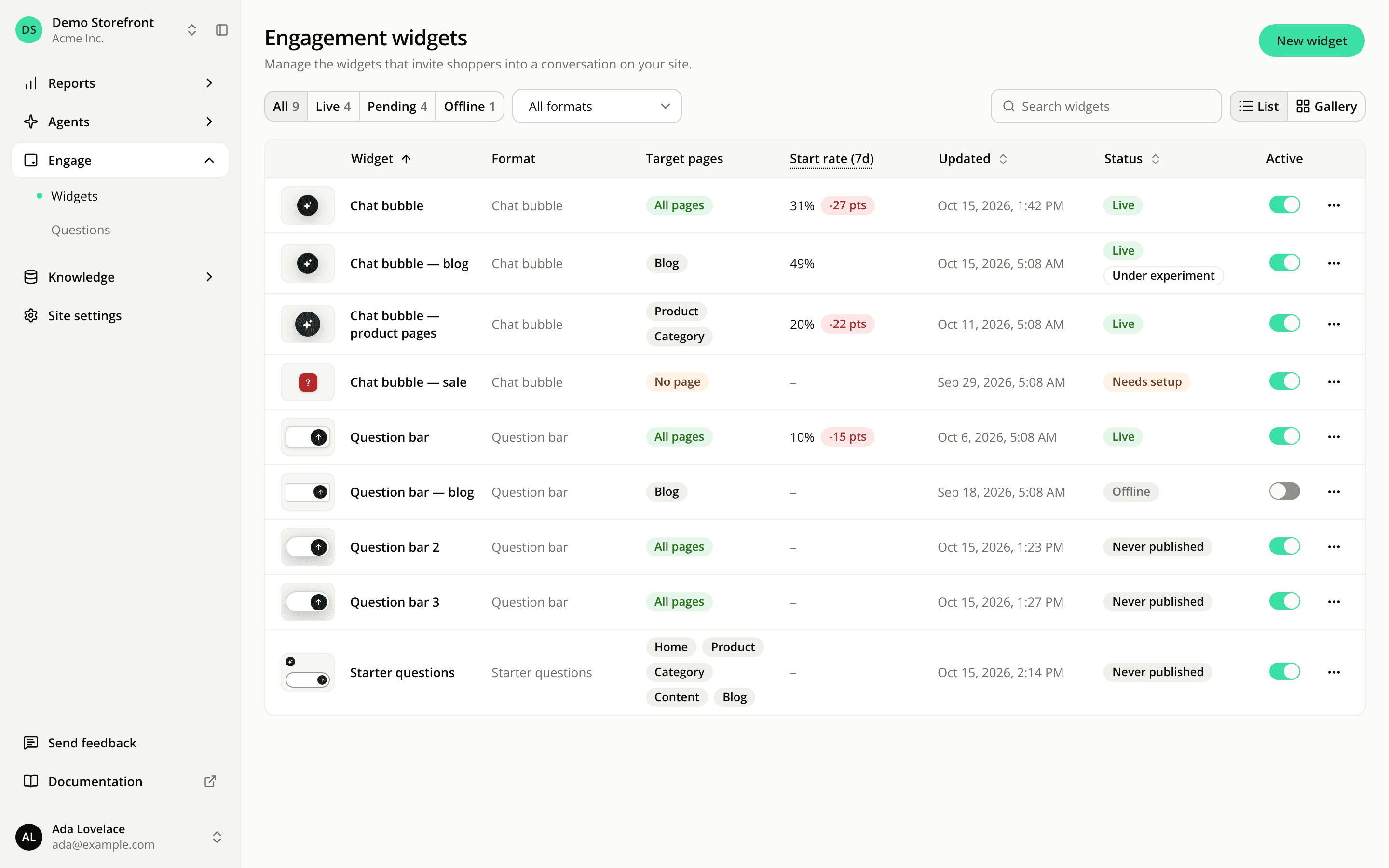
A simpler engagement widgets list
ChangedThe engagement widgets list is easier to scan.
Filter by status in one click. The toolbar now opens on All, Live, Pending and Offline, each with its count. Pending groups the widgets that are switched on but show nowhere yet (Never published and Needs setup). The counts always cover every widget on the site, so a search never hides how many still need work. A saved link that filtered on the old Needs setup value now opens on All.
Fewer, clearer columns. Each row shows the widget's thumbnail, name, format, target pages, Start rate (7d), last update, status and its Active switch. The placement column and the 7-day trend line are gone; the start rate's change against the previous week is now a small tag. A widget with no views in the last 7 days shows a dash; the Engagement report still lists the inline widgets that never appeared because their mount point wasn't found.
Unpublished work is a red dot. The old "Draft waiting" text is replaced by a red dot next to the update date, labelled Unpublished changes. In the table, the status is now a coloured tag with no explanation line under it, and the Active switch has its own column.
A lighter gallery. Gallery cards now show the thumbnail, name, update date, format and page tags, then the status and the Active switch, in one to four columns depending on your screen. They no longer show placement or performance.
Resources