Quality gets Conversations and Knowledge tabs
AddedReports > Quality now has four tabs: Satisfaction, Conversations, Knowledge and Feedback. Satisfaction is the page you already know, and Feedback is the full ratings table, now one click away. The "Knowledge quality: coming soon" card at the bottom of Satisfaction is gone.
The two new tabs read the labels the AI judge writes on your conversations. Both are marked Beta.
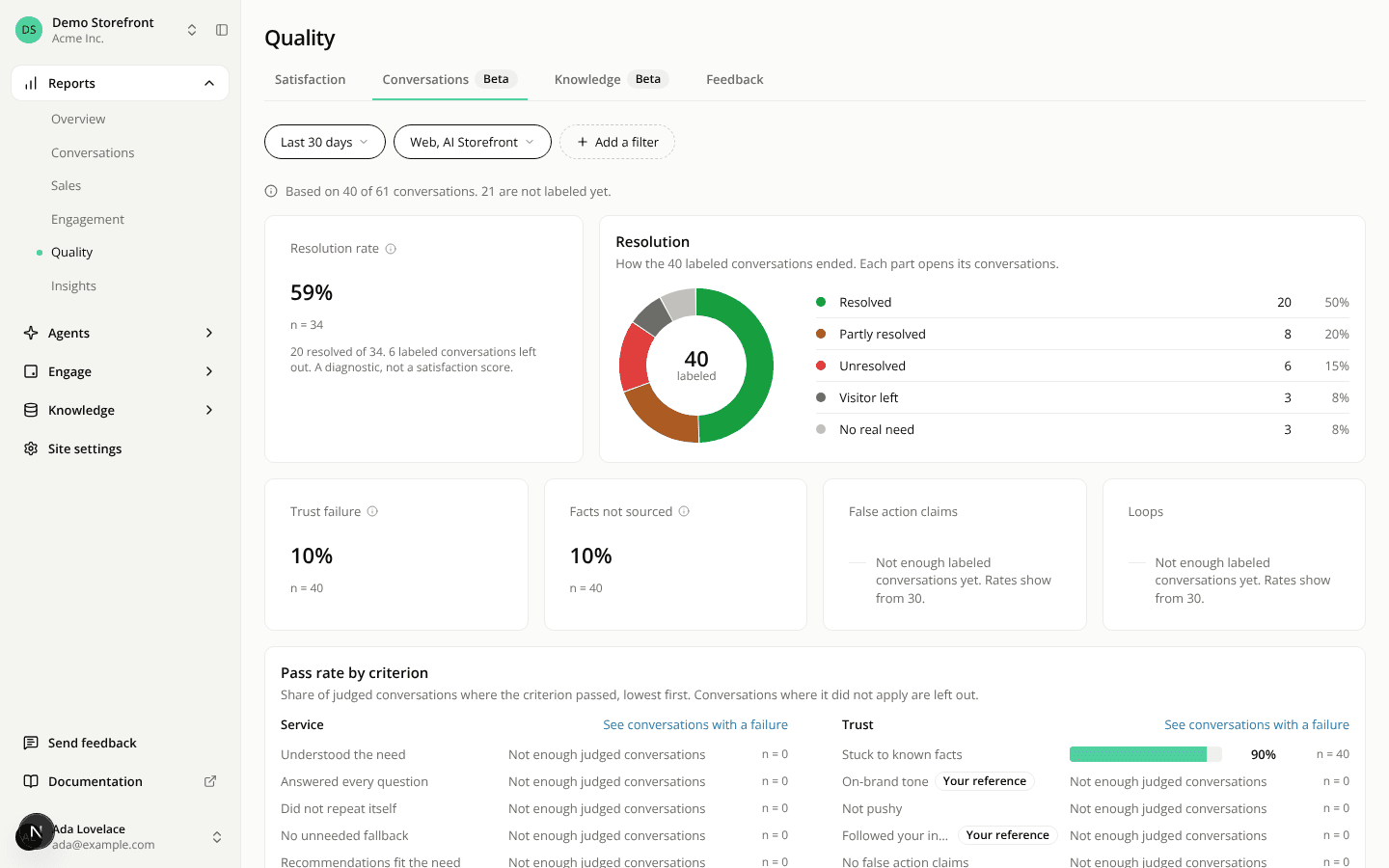
- Conversations: a resolution rate, a ring showing how conversations ended (resolved, partly resolved, unresolved, visitor left, no real need), the share of conversations with a trust failure, and a pass rate for each judged criterion. Each part of the ring opens the matching conversations.
- Knowledge: the share of conversations with a content gap, the answer rate, and the five gap types ranked by how many conversations hold them. Each gap type opens its conversations and links to where you fix it (Connectors, Pages or Tools), if you have access to that section. Topics behind the gaps and the capabilities your assistant was missing are listed below.
Things to know before you read a number:
- Beta labels, not a satisfaction score. The resolution rate counts partly resolved conversations as not resolved. It says what the judge found, not what shoppers felt.
- Only labeled conversations count. A conversation is labeled about 30 to 90 minutes after it goes quiet. A line at the top says how many conversations the figures rest on. Conversations whose shopper objected to measurement are never counted.
- No percentage under 30 conversations. A figure with fewer than 30 conversations behind it shows its sample size instead.
- The most recent 10,000. A page reads at most the 10,000 most recent labeled conversations in your filters, and says so when it stops there.
The tabs use the same filters as Satisfaction, without Customer feedback.
Resources