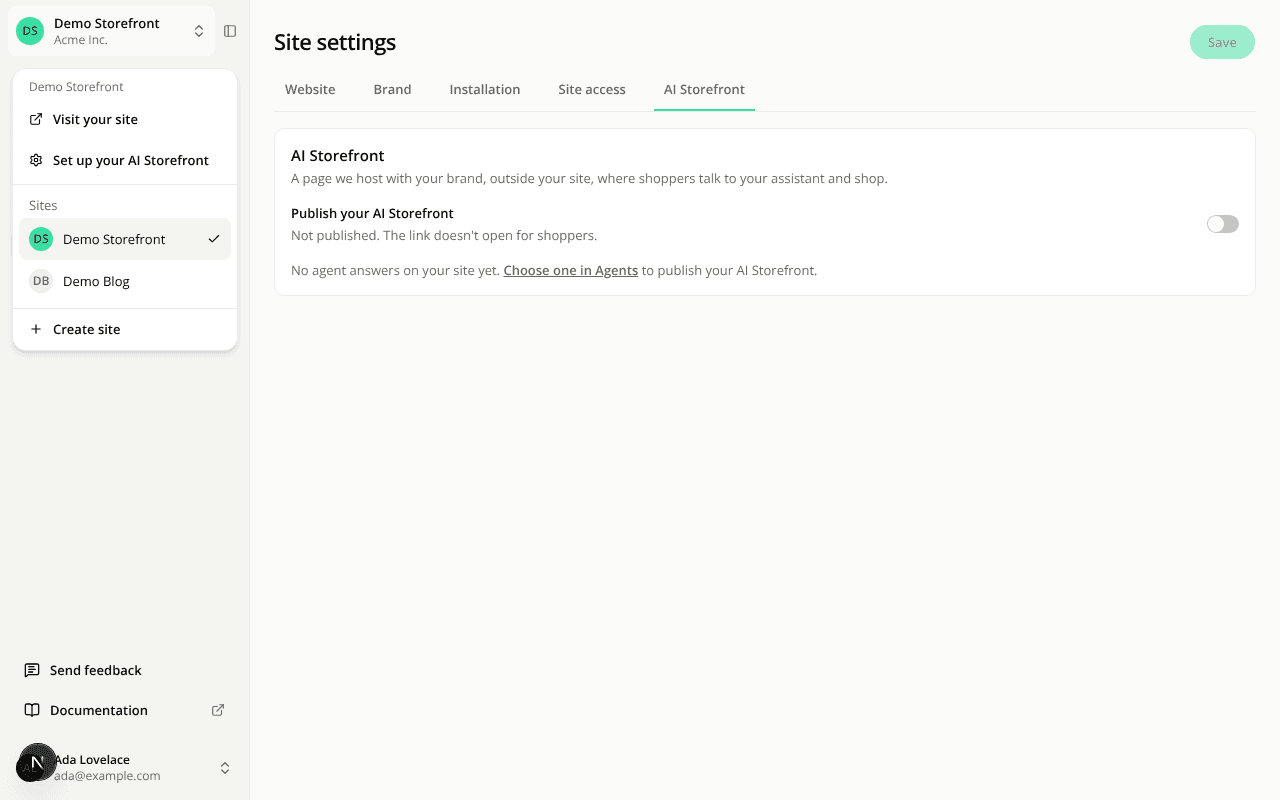
Your hosted page is now the AI Storefront, with its own settings tab
ChangedOne name: AI Storefront. The page we host for your site at /s/…, where shoppers talk to your assistant and shop, used to be called the hosted page, the public link or public access depending on where you looked. It is now AI Storefront everywhere in the dashboard (Boutique IA in French, KI-Shop in German). The Hosted Page source in the Conversations, Reports and Event check filters now reads AI Storefront. Your link doesn't change, and the API and the MCP server still call the source hosted.
Its own tab in Site settings. It moved out of the Installation tab into a fifth tab, AI Storefront. Turn on Publish your AI Storefront and click Save to put it online. The tab names the agent it serves, with a link to Agents to change it. Once it's published, you get the link with Copy link and Open, and a line saying which language it opens in: the shopper's browser language when your site offers it, otherwise your default language. A bookmark to the old Public access page now opens this tab.
Open it from the site menu. Click your site's name at the top of the sidebar: a new section for the current site has Visit your site and Open your AI Storefront, both in a new tab. While it isn't published, members who can edit the site see Set up your AI Storefront instead, which opens the tab.
Rotating the key says what breaks. The Rotate key confirmation on the Installation tab now spells it out: AI Storefront links you already shared (newsletters, bios, campaigns) stop opening, and the tag installed on your site needs the new key.
Resources