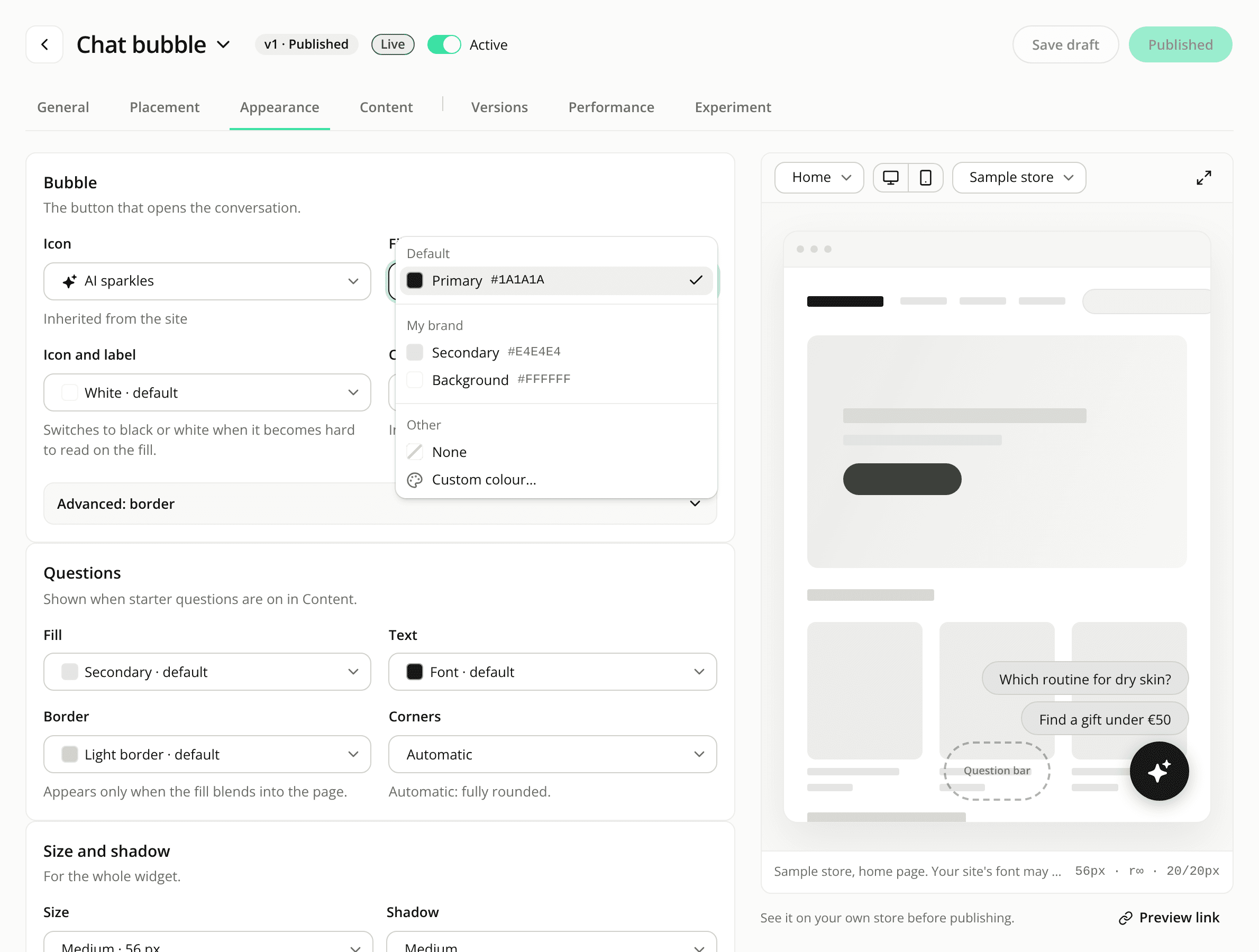
Widget colours name their default, and No icon moves into the Icon menu
ChangedA colour field tells you what it uses. On a widget's Appearance tab, a colour left alone used to read "Automatic". It now names the colour and says it is the default, for example "Secondary · default" or "White · default". A colour you picked yourself reads "#F4D7C6 · custom", and a brand colour reads by its name. The information icon next to the card titles is gone: the fields say it themselves.
The colour menu is grouped. Open a colour and you get Default, My brand (Primary, Secondary, Font and Background, each with its hex code) and Other (None where the element can go without, and Custom colour…). A colour already shown as the default isn't listed a second time. A short line under a field explains a default that adapts, such as a text colour that switched to black or white to stay readable.
Pick a colour from the screen. In browsers that support it (Chrome and Edge, for example), the colour picker has an eyedropper beside the hex code. It's there in the widget editor and on your site's Brand settings.
No icon is now in the Icon menu. The Show icon switch is gone. Choose No icon at the end of the Icon menu instead. On a chat bubble it appears once the bubble has text, since a bubble needs one or the other. The question bar doesn't offer it. On the bubble, the inline button and the Starters header, the Icon menu now sits with the main settings instead of under Advanced.
Nothing about how your widgets look on your site changes.
Resources