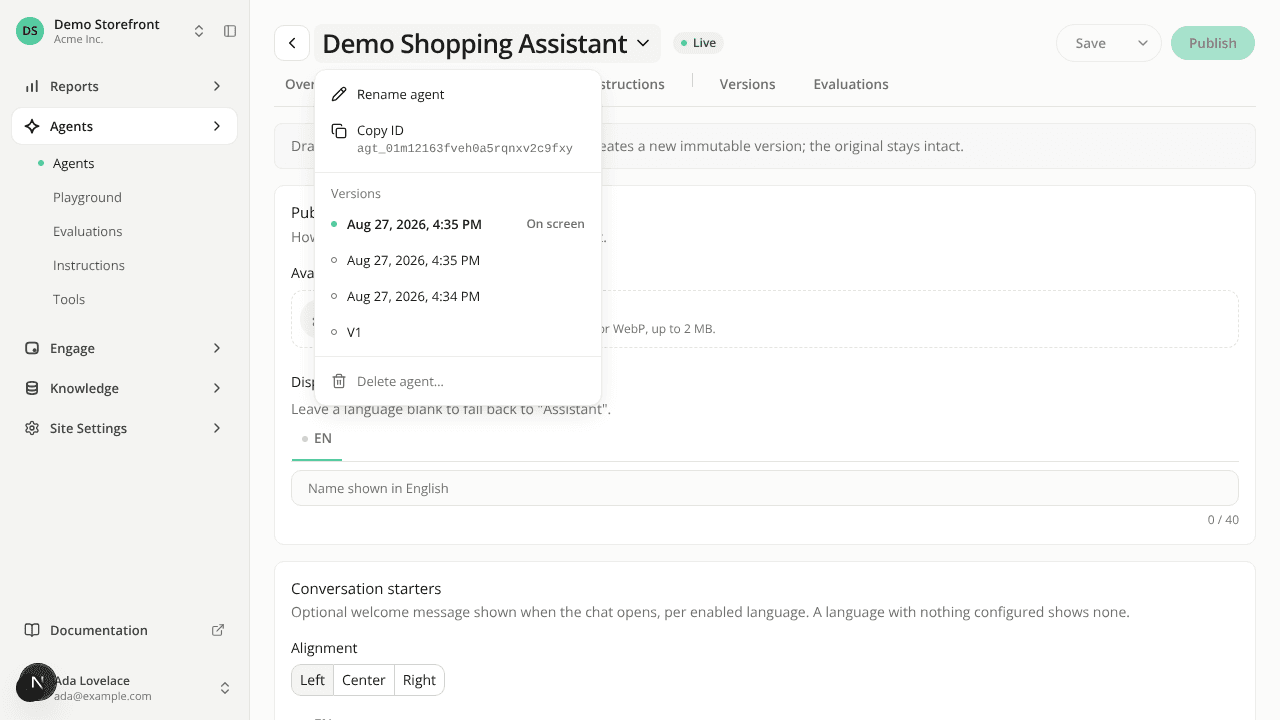
Save and Publish move to the agent header
ChangedThe agent builder now uses the same header as the engagement widget editor, and it stays at the top of the page while you scroll.
Save and Publish are in the header. On Identity, Capabilities and Instructions, Save (with Save as candidate in its menu) and Publish sit on the right of the header instead of in a bar at the bottom of the page. Unsaved changes appears beside them while you have edits to save.
The agent's name is a menu. Click it to Rename agent, Copy ID (the ID is shown before you copy it), open one of up to five versions, the live one first, then the most recent or Delete agent…. When the agent has more versions, See previous opens the Versions tab. Deleting asks you to confirm, then returns you to the agents list. The type badge and the ID that sat under the name are gone.
Live or Offline at a glance. A chip next to the name shows whether the version on screen is the live one.
A greyed-out button now says why. In the agent builder and the widget editor, hover over a Save or Publish you can't use, or reach it with the keyboard, and a tooltip explains, for example "Nothing to save yet: make a change first." or, in the widget editor, "Save your changes first. Publishing sends the last saved version."
The widget editor's name menu also gains Copy ID.
Resources