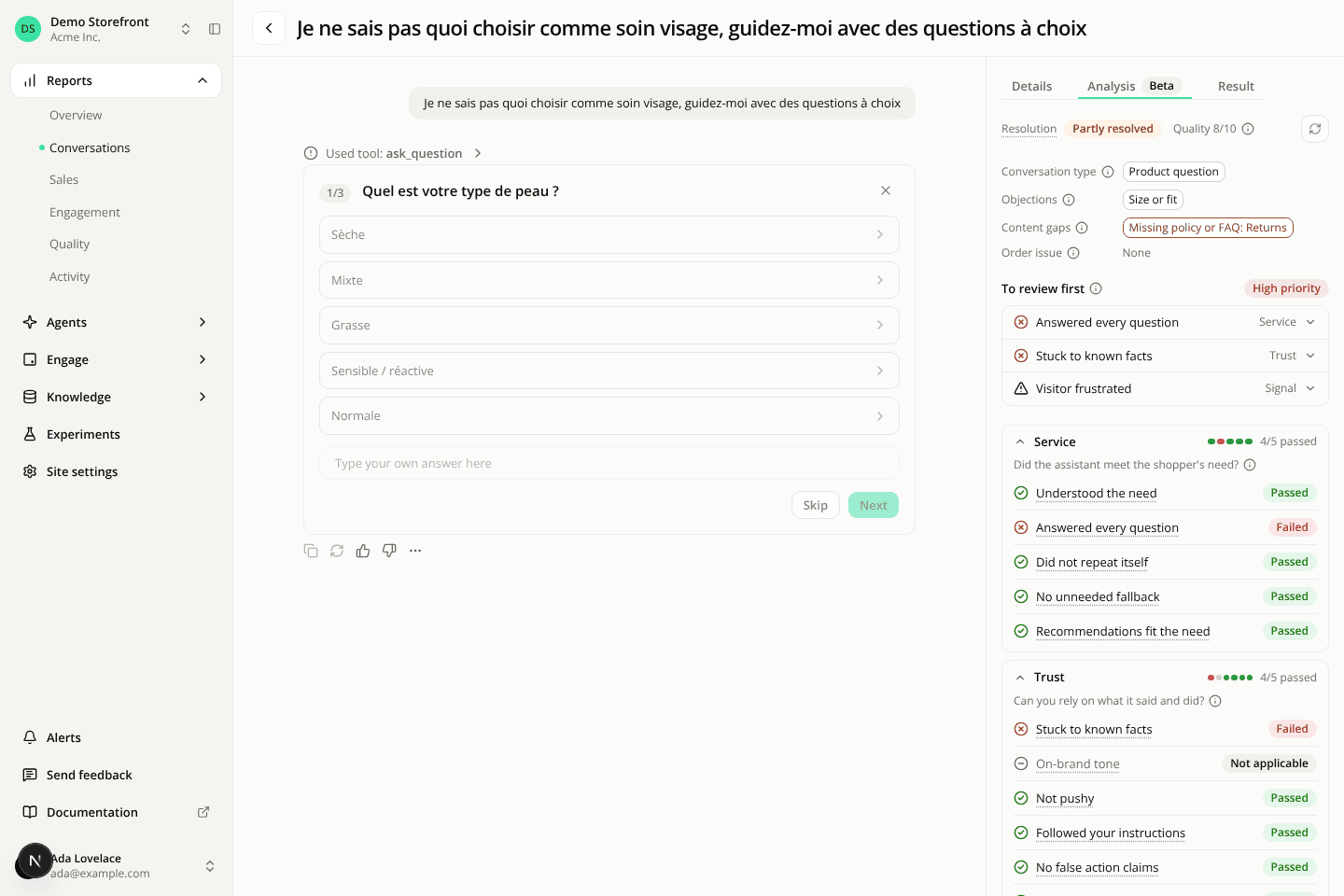
The conversation rail is now three tabs, with a clearer Analysis tab
ChangedThe rail beside a conversation's transcript used to be a stack of folding sections. It's now three tabs: Details, Analysis and Result. The rail opens on Details every time you load a conversation. On a narrow screen, the Details button opens the same tabs in a side panel.
- Details holds the agent, version, source, language, creation date, entry widget and conversation id. Delete conversation sits at the bottom of this tab, for members who can delete conversations.
- Result now holds the shopper's thumbs-up and thumbs-down tally, which had its own Feedback & quality section, above the impression and click counts and the orders linked to the conversation.
The Analysis tab leads with what needs your attention. From top to bottom:
- A header with the resolution, the Quality score (for example "Quality 8/10") and Label now, now an icon button with a refresh arrow.
- Facts as chips: conversation type, objections, content gaps (with their topic, such as "Missing policy or FAQ: Returns") and order issue. A block with nothing reads "None".
- To review first: one compact row per failed criterion, tagged Service or Trust, then Visitor frustrated and Needed a person when the judge detected them, tagged Signal. Click a row to open its value, the label's definition and the messages it cites. The review priority shows as a badge beside the title.
- Service, Trust and Signals groups, one under the other, each listing every label of its group on its own row. A group folds on its header, which shows the score and one bar per criterion (Service, Trust) or the number of signals detected. A group opens by itself when it holds a failed criterion or a detected signal.
The Show all labels switch is gone: an open group always lists everything.
Every name has a definition. Click or tap a label, a fact chip, the resolution or an information icon to read what it means in plain words, or press Enter on it from the keyboard. Moving the mouse across the tab opens nothing. The definition stays open until you close it, so you can follow the evidence links inside a fact chip. This works the same on a phone or tablet.
Resources